1. About
Best Trigger 3 is a drum trigger. It finds every hit on a recorded kick, snare or tom track and plays your samples instead of the original or together with it.
- Up to six samples at once, each with level, pan, tune, envelope, filters, Mute/Solo and phase flip.
- Multisamples: velocity layers and round-robin takes, the
.bt3format. - An oscilloscope with a draggable threshold, Retrigger and sample Offsets.
- Phase tools and Full Auto.
- A | B, Undo/Redo, presets, a sample browser, MIDI in and out.
2. Installation
Requirements: Windows 10/11 (64-bit) or macOS 10.15 and newer; a host (DAW) that loads VST3 plugins.
Windows
- Download the installer from download page and run it. If Windows shows a blue warning, click More info → Run anyway.
- Close your DAW first and rescan plugins afterwards.
- Insert the plugin on a drum track as an effect.
macOS
macOS warns you the first time: see how to allow the plugin.
3. Trial and licence
You can try Best Trigger 3 for 14 days with all its functions, or enter a licence key you bought (how to buy). Internet is needed once for either.
The trial
- Insert the plugin. Its window offers Start 14-day trial: press it.
- All functions are open for 14 days. The bottom right corner shows how many days are left.
- The trial is one per computer: deleting the plugin or reinstalling the system does not start it again.
The licence
- Type your key
XXXXX-XXXXX-XXXXX-XXXXXin the window and press Activate. It works at any time, also during the trial. - The bottom right corner then says Licensed.
- One key, one computer. To move the licence press Deactivate this computer in the licence window, then activate on the new one.
- The plugin works offline and checks the licence from time to time when online.
- Usage statistics are sent only if you agree (gear → Help improve Best Trigger). Your audio is never sent.
When the trial has ended
The licence window stays over the plugin until you enter a key. Your project is not changed: the sound passes through, but no samples are played, and every 15 seconds the plugin hisses for about four seconds. Enter the key and everything works again at once.
4. Quick start
- Insert the plugin on the drum track as an effect (see Installation).
- Press Start 14-day trial or enter your key (see Trial and licence).
- Put samples in: drop a file on a plate, right-click the plate, or open the Browser. A click on a plate plays it (further right = harder).
- To hear the original too, raise the Original fader to 0 dB (it starts at −∞).
- Start playback and choose Full Auto (button in the right panel): the plugin listens to the music and sets the threshold, the phase of the samples and their levels.
- Look at the result on the scope: Timeline (the hits), Phase (the last hit), Spectrum (the frequency response).
5. The window
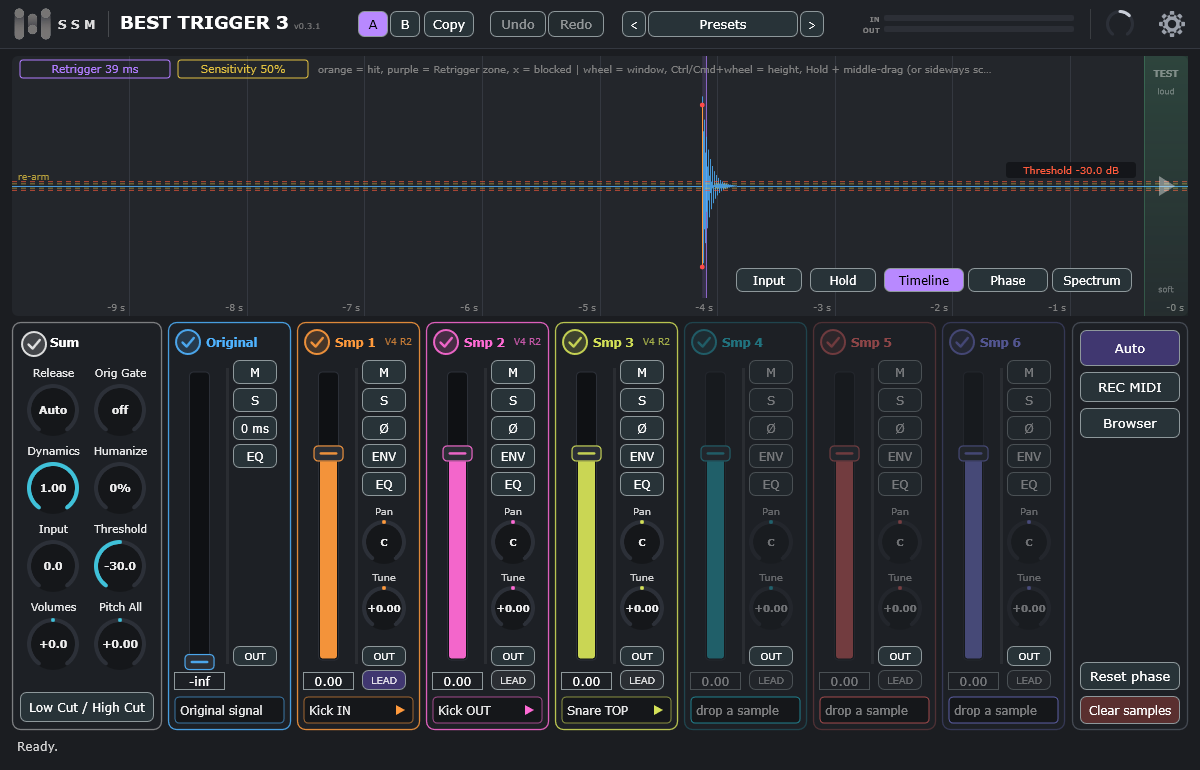
| Area | Purpose | |
|---|---|---|
| Top panel | A / B / Copy, Undo / Redo (5 steps), Presets, IN/OUT meters, master output knob, gear menu (a red dot means a new version). | |
| Scope | Three views, one button each at the bottom right of the scope (details below): Timeline, Phase and Spectrum. Hold next to them freezes the picture. The green TEST strip on the right fires a test hit: higher click = harder hit. | |
| Low Cut / High Cut | Filters for the detector only; the sound does not change. At the ends of their ranges (20 Hz and 20000 Hz) they are off. | off |
| Channels | Original and Smp 1–6: trace tick, fader, M, S, Ø, ENV, EQ, Pan, Tune, and a plate with the sample name (the Original has EQ). | |
| Right panel | Full Auto, Auto Threshold, Auto Phase, Auto menu (the other auto tools), REC MIDI, Browser, Reset phase (all offsets and polarity to zero), Clear samples. | |
| Header | Click the logo: the web site. The name: About (version, licence, check for updates, manual, Telegram). The version number: the list of changes. | |
| Outputs | Output carries everything. There are 7 more stereo outputs: Original and Smp 1 … Smp 6. Press OUT on a channel to send it to its own output (it then leaves the main Output) and route that output to a track in your DAW. In REAPER: right-click the plugin name in the FX chain → Build multichannel routing for output of selected FX. |
Shift makes every knob and fader ten times finer. Double-click resets a value; right-click a knob to type a number.
The scope: three views
- Timeline (the starting view): the hits in time. Here you set Threshold, Retrigger and Sensitivity (section 6). Each hit is a line whose height shows how hard it was (its velocity), with a small red dot at each end. The Input / Output button next to Hold chooses what the waveform shows: what comes in, or everything you hear from the plugin.
- Phase: the last hit as the original, the samples and their sum (section 10).
- Spectrum: the frequency response of the output, 20 Hz – 20 kHz. The boxes above the picture:
- Speed: very slow / slow / medium / fast / total (all the energy gathered since it was chosen).
- Mode: Energy or RMS.
- Slope: click and type a number, dB per octave (−12 … 12).
- Bands: 41, 61 or Hi-res (a finer picture, a little more load).
- The triangles ▲ ▼ stretch and squash the curve vertically (Shift = finer). Drag the picture up and down with the mouse (or the middle button, or two fingers on a trackpad).
- Reset (top right) starts the picture again.
Separate outputs (REAPER)
- Add the plugin to a track. Right-click its name in the FX chain → Build multichannel routing for output of selected FX: REAPER creates a track for every output.
- In the plugin press OUT on the channels you want on their own tracks (the original and Smp 1 … Smp 6).
- Such a channel plays on its own track and leaves the main Output.
Separate outputs in other DAWs, and Mac
Separate outputs are extra output buses of the plugin. They are tested in REAPER only. Other VST3 hosts (Cubase, Ableton Live, Studio One and others) may or may not offer such buses for an effect plugin. If you do not see them, use the main Output: everything plays there as long as no OUT button is on.
Logic Pro and Pro Tools do not load VST3 plugins (Logic uses only Audio Units, Pro Tools only AAX), so Best Trigger 3 cannot be used in them at the moment.
Mac and trackpad: where this manual says Ctrl + click or drag, use Cmd on a Mac (a Ctrl + click there is a right click; the right click is a two-finger tap). On the Spectrum view drag the picture with the mouse or with two fingers; Cmd + scroll stretches the curve. In Timeline with Hold, a sideways two-finger scroll replaces the middle-button drag.
Presets
A preset stores all settings and loaded samples. The Presets button opens the list; use Save, Save as…, Delete and Initialize (default settings). The arrows step through presets, and Undo takes a loaded preset back.
6. Hit detection
Set these on the scope in the Timeline view. Drag a value box up or down to change it (Shift = finer; the wheel over it changes it a little); a double-click lets you type a number.
| Parameter | Meaning | Default |
|---|---|---|
| Threshold | The level above which the signal is a hit. Drag the red lines. If the threshold of the Sensitivity (below) is higher, that one decides. | −12 dB |
| Sensitivity | 0–100. The lower it is, the louder a hit has to be to be noticed: it sets a threshold of its own (very high at 0–5, about −6 dB at 10, about −22 dB at 50, about −41 dB at 100). The higher of this threshold and the Threshold decides. Drag the box up or down, or double-click and type. | 50 |
| Retrigger | The dead time after a hit. Drag the edge of the purple zone, or the Retrigger box up or down. | 40 ms |
| Input | How a hit is turned into a velocity: the velocity is proportional to the peak of the hit, and a hit that peaks at the Input level is velocity 127 (the loudest layer). The default (−6 dB) is the scale of the well-known trigger: layers and the level inside a layer behave as they do there. Full Auto sets it to your loudest hits; or drag the green Loud line. The Threshold is only where a hit is noticed. | −6 dB |
| Low Cut / High Cut | Filters for the detector only; the sound does not change. | — |
Dynamics: 1.00 = the hit strength fully controls the layer and loudness; 0 = always the hardest layer at full level.
- Start playback; the wheel zooms the time window, Hold freezes the picture; the height fits itself.
- Drag the red lines so that real hits cross them and unwanted sounds stay below.
- Crosses mark sounds skipped by Retrigger. Real hits crossed out: lower Retrigger. Several lines on one hit: raise Retrigger or the Threshold.
7. Samples and mixer
On every hit all loaded samples play at once.
- drop a file on a plate, or right-click the plate: Load sample or .bt3 file…, Load folder (multisample)…, Save multisample file (.bt3)…, Copy sample and Paste sample (the same sample into another channel), Rename… (the name on the plate; it is saved with the project), Copy sample name (name and extension, to the clipboard), Clear sample. WAV, AIFF, FLAC.
- Drag a plate onto another plate: the two samples swap places (Ctrl/Cmd held: a copy is put there and the first stays). Levels, pan and the other settings stay with the channels.
- Ctrl/Cmd + click on plates, or a frame drawn over the empty part of the mixer, selects samples (white border). In the Phase view, dragging the Offset of one selected sample moves all the selected ones by the same amount. A click on an empty place clears the selection.
- A click on a plate plays only that sample with all its settings; further right = harder.
| Element | Description |
|---|---|
| Tick | Shows or hides the trace on the scope. |
| Fader | Level, −∞ to +24 dB. Original starts at −∞, samples at 0 dB. |
| M / S | Mute and Solo. Right-click M, S or Ø: only this channel gets it, all the others lose it (a quick way to listen to one). |
| Latency | The original is delayed by the plugin latency (39 ms; the DAW makes up for it) so that samples can start before it and be moved earlier with a negative Offset. |
| Ø | Flips the phase of the sample. |
| ENV | Attack, Sustain and Release of the sample. |
| EQ | An equaliser for this channel, the Original too: Low Cut, Low Shelf, three Bells, High Shelf and High Cut. A click opens the EQ window over the scope (the scope buttons are hidden until you close it). Drag the dots; the wheel over a bell changes its width (Q); a double click on a dot resets it; a right click on a dot switches that filter off and on and keeps its numbers. The numbers of the selected dot are shown at the bottom left and can be typed (1500, 1.5k, gain in dB). Low Cut and High Cut also have a Slope: 6, 12, 18 or 24 dB per octave (12 is the usual one). The arrows ▲ ▼ change the height of the picture: 3, 6, 12 or 30 dB. A right click on the EQ button switches the whole EQ of the channel off and on. The Low Cut and High Cut that samples had before are the Low Cut and High Cut of this EQ, so older projects sound the same. |
| Pan, Tune | Pan L100…R100; pitch ±24 semitones. |
| Release | Auto (default): a new hit fades out the previous sample of the same channel by itself, faster on fast parts. off keeps the tails; or set a time. |
| Orig Gate | After a hit the original stays audible for this time, then closes. The further right, the shorter; all the way left = off. |
| Humanize | Small random changes of level, pitch and timing on every hit. |
8. Multisamples
A multisample has velocity layers and several round-robin takes. Load a folder: right-click a plate → Load folder (multisample)…. Name the files like Name_R1_V0.wav (Name_V0_R1.wav works too):
- R + number: the take.
- V + number: the velocity (0–127) from which the layer plays, e.g.
_V0,_V50,_V105. - Small numbers (
_V1 … _V4) are spread evenly; the plugin checks which end is the loudest recording, so it does not matter which number is the hardest hit.
To save a multisample as one .bt3 file: right-click the plate → Save multisample file (.bt3)….
9. Library and browser
- Library folder: gear → Sample library. By default
Documents\SSM-Audio\Best Trigger 3\Library. - Browser (right panel): a tree of your library with a search box (type to search, the cross clears it) and Audition. A click plays a file; a double-click loads it into the next free channel; you can also drag onto a pad. Right-click a file for more, right-click a pad to clear it. A sound file can also be dragged from the browser straight into the DAW.
- Remember place (bottom left): the browser opens where you stopped. WAV and BT3 files have different icon colours.
- Online libraries…: free libraries with a cover and the author's text. Choose one and press Download and install.
- WAV to .bt3…: turns WAV files into
.bt3files (one file per sample, smaller and quicker to load): the selected file or folder, or the whole library. The.bt3is put next to the WAV; existing ones are never overwritten. Afterwards you are asked whether to delete the source WAV files (they go to the Recycle Bin). - Migration…: converts a
.tcilibrary into.bt3files. Choose the folder; the files are created in your library. Convert only free samples or your own. - Converted
.tciinstruments are played at the sample rate written in the file and at the volumes written in it (how loud each layer plays at its lowest and highest velocity), exactly as the well-known trigger plays them. Instruments converted by an earlier version are converted again from their.tciwhen you run the conversion again.
10. Phase
Next to each sample name is a role button: LEAD (lined up with the original; the first LEAD sample is the leader), FOL (moves together with the leader: rooms and overheads) and ALIGN (finds its own offset and polarity against the leader, without music: Out, Sub). Samples of one set also play the same take on every hit.
A sample played with the original can thin out the sound if their waves cancel. Press the Phase button on the scope to see the last hit: the original, the samples and their sum.
- Click a Smp box at the top of the scope and drag the graph left or right to move that sample's Offset (±30 ms; Shift = finer, double-click the graph = 0), or drag the box up or down. With several samples selected, they all move together.
- If the first waves go in opposite directions, press Ø.
- Watch Sum gain: green (+1.5 dB or more) is good, red (below −1.5 dB) means the channels cancel.
Auto → Track phase on every hit fine-tunes the start of each sample by up to ±2 ms. It works best on a clean track.
11. Auto
The main tools have buttons of their own in the right panel: Full Auto, Auto Threshold and Auto Phase. The Auto menu button opens a menu with the others. While a tool listens to the music, its button blinks. Every result can be undone with Undo.
| Button / menu item | What it does |
|---|---|
| Full Auto (button) | Sets Threshold, Retrigger, Sensitivity and Input and aligns the phase of each sample. |
| Auto Phase (button) | Finds the Offset and Ø of each sample. |
| Phase detection wide range / Phase detection narrow range (best in 99%) | What the phase is measured on: wide range = the whole signal, narrow range = the bass only. Narrow range is the best choice in 99% of cases. |
| Track phase on every hit | Switches phase tracking on or off. |
| Match samples to the original | Sets sample levels from the loudness of the original. |
| Make samples equally loud | Evens out the samples; no music needed. |
| For best sound | Sets the levels of the samples for a modern kick sound (set the phase first). |
| Auto Threshold (button) | Sets only the detector: Threshold, Retrigger, Sensitivity and Input. |
The tools need sound: start playback.
12. MIDI
- Output: every hit is also sent as a MIDI note (gear → MIDI out note).
- Recording: press REC MIDI, play, press it again, then drag the green drag MIDI clip to DAW handle onto a MIDI track.
- Input: gear → Trigger source → MIDI and a MIDI in note; the velocity sets the hit strength.
13. Settings (the gear)
| Item | What it does |
|---|---|
| Interface scale | Window size, 70–200%. |
| Scope smoothing… | Smooths the picture only. |
| Trigger source | Audio or MIDI. |
| MIDI in / out note | The notes. |
| Sample library | The library folder and migration. |
| Auto trim | Off by default: when on, it lowers the output knob by what goes over 0 dB; never raises it. The letter A in the knob shows it; Ctrl + click on the knob switches it (Cmd + click on a Mac), as does the settings menu. |
| Precise sample start | On by default (gear menu). The samples start at the real beginning of the hit, as in the well-known trigger, whatever the Threshold is. Switched off, a sample starts at the moment the signal crosses the Threshold, a few milliseconds late (more for soft hits). Projects made before this setting existed have it off, so they sound as before. |
| Remember last samples / settings | A new plugin starts with your last samples and/or settings. Both are off by default; a saved project always opens with its own samples. |
| Help improve Best Trigger | Usage statistics and error reports; off until you agree. |
| Quick start guide…, Manual, Website | Help. |
| Check for updates | Green when a new version is out. |
| About, License… | Version and licence. |
The plugin reports a latency of about 39 ms to the DAW, which compensates for it. Do not monitor live playing through the plugin.
14. Troubleshooting
| Problem | What to do |
|---|---|
| The activation window will not close | Enter the key and press Activate (internet needed). Or press Start 14-day trial. |
| "This key is already used on another computer" | Press Deactivate this computer there, then activate here. |
| "Locked" / "Missing" on a plate | Locked: activate the plugin. Missing: load the file again. |
| No sound from the samples | See section 7. |
| Only the sample is heard | Raise the Original fader. |
| A hit triggers twice | Raise Retrigger (or the Threshold). |
| Fast hits are missed | Lower Retrigger. Quiet hits are missed: lower the Threshold and raise Sensitivity. |
| It triggers on other drums | Raise Threshold, narrow the detector filters, or put a gate before the plugin. |
| Thin sound, Sum gain red | Press Ø or move the Offset (section 10). |
| A multisample plays upside down | Rename the files (section 8). |
| The plugin is not in the DAW | Rescan plugins. |
15. Legal
© 2026 SSM-Audio. All rights reserved. The program is licensed for use; copying, redistribution and decompiling without the owner's permission are forbidden.
The plugin uses the JUCE framework, TweetNaCl and a method from the tci2wav project (MIT). Licence texts: THIRD_PARTY_NOTICES.md. VST is a trademark of Steinberg Media Technologies GmbH.